Free · हिंदी · No upload
Edit Hindi PDF online — हिंदी PDF एडिट करें
Change Hindi names, marks and application forms in any PDF. Matras and conjuncts are shaped correctly and the text stays searchable — free, and your file never leaves your device.
- मात्राएँ और संयुक्त अक्षर सही बनते हैं
- Hindi and English in one document
- Edited text stays searchable and copyable
- Runs in your browser — nothing uploaded
Drop your PDF here
or
Your file never leaves your device
What is Panna Hindi PDF Editor?
Panna Hindi PDF Editor is the Hindi mode of Panna, the free online PDF editor made by TestoZa. It edits Unicode Hindi (Devanagari) text in PDFs with correct matras, conjuncts and reph, keeps the edited text searchable, and works in the browser without uploading the file or creating an account.
- Price
- Free
- Account
- Not needed
- Watermark
- None
- Privacy
- Files are processed in your browser and never uploaded
- Languages
- English and Hindi (Devanagari)
- Works on
- Android, iPhone, Windows, Mac and Linux, in any modern browser
- Made by
- TestoZa Educational Systems, Chennai, India
- Hindi text
- Unicode Devanagari; new text set in Noto Sans Devanagari
हिंदी PDF कैसे एडिट करें — how to edit a Hindi PDF
PDF खोलें · Open the PDF
ऊपर वाले बॉक्स में PDF डालें या “Choose PDF” दबाएँ। फ़ाइल आपके ब्राउज़र में ही खुलती है, कहीं अपलोड नहीं होती। Drop the file above — it opens in your browser and is never uploaded.
हिंदी टेक्स्ट पर क्लिक करके लिखें · Click and type
जिस लाइन को बदलना है उस पर क्लिक करें और लिखें — Gboard, Windows का हिंदी कीबोर्ड या कहीं से कॉपी करके पेस्ट करें। Click the line and type in Hindi, or paste Hindi text.
डाउनलोड करें · Download
Download दबाएँ। PDF बिना वॉटरमार्क और बिना अकाउंट के तुरंत मिल जाएगी। Press Download — no watermark, no account.
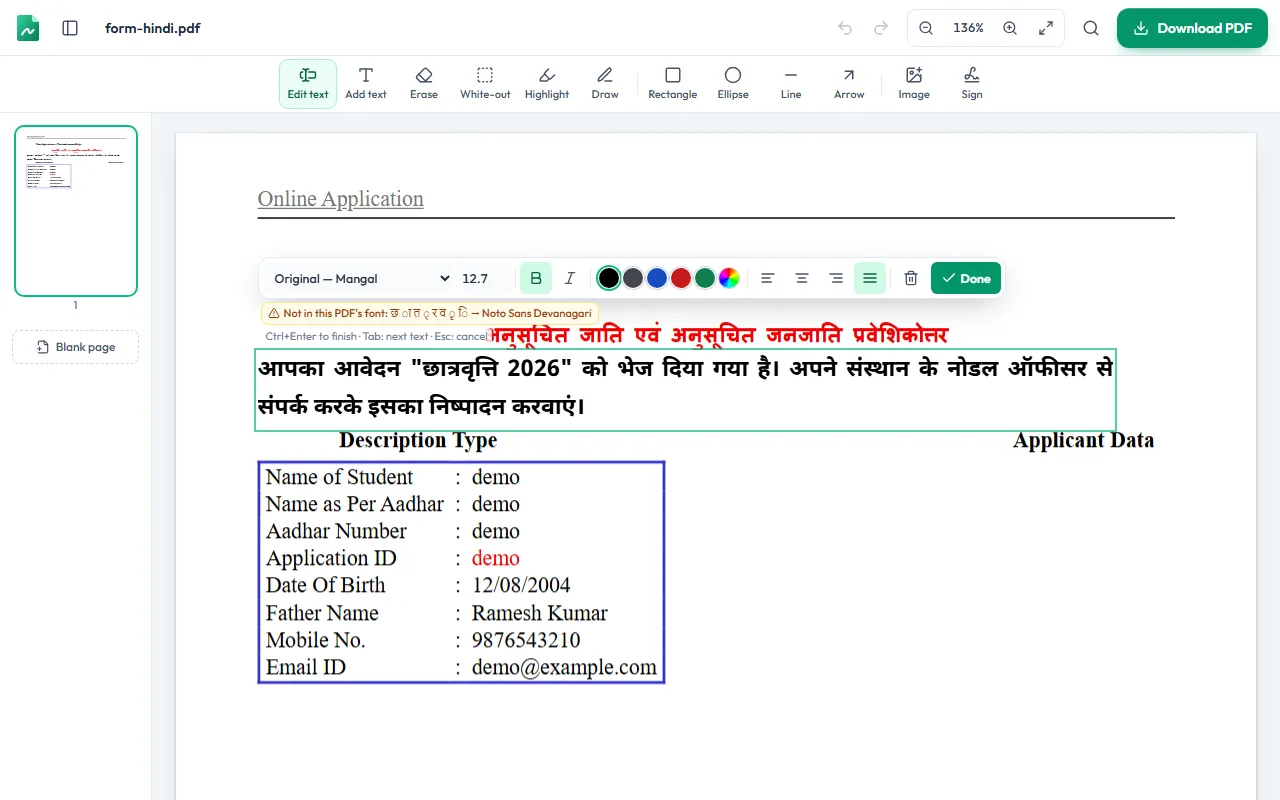
Why Hindi text breaks in most PDF editors
Hindi is not written one letter after another. The ि matra is drawn before the consonant it follows, क्ष and त्र are single joined shapes, and the reph in धर्म sits on top of the next letter. Getting this right is called text shaping.
Many PDF editors skip shaping, so edited Hindi comes out with matras in the wrong place, broken conjuncts, or text that can no longer be searched or copied. Panna shapes every word with the OpenType rules of Noto Sans Devanagari and stores the real Hindi text alongside it, so the page looks right and search, copy-paste and screen readers still work.
Which Hindi PDFs can be edited?
| Type of Hindi PDF | What to do | Why |
|---|---|---|
| Unicode Hindi (Mangal, Nirmala UI, Noto, Kokila; PDFs from Word, Google Docs or Chrome) | Edit in place | The text is stored as real Hindi letters, so Panna can change it and keep it searchable. |
| Old non-Unicode fonts (Kruti Dev, DevLys, Chanakya) | Erase and retype | These fonts store Hindi as English letters, so the text shows up jumbled when edited. Erase the line and type it again with Add text. |
| Scanned documents and photos | White-out and type | A scan is a picture with no text layer. Cover the old words with White-out and add new text on top. |
Typing Hindi: कैसे लिखें
- Android / iPhone: add Hindi in Gboard or the iOS keyboard and type phonetically (“namaste” → नमस्ते).
- Windows: Settings → Time & language → Language & region → add Hindi, then switch with Win + Space.
- Anywhere: write the text in Google Docs or WhatsApp, copy it, and paste it into the PDF.
सवाल-जवाब · Questions
हिंदी PDF में टेक्स्ट कैसे बदलें?
- Panna में PDF खोलें, जिस हिंदी लाइन को बदलना है उस पर क्लिक करें, नया टेक्स्ट लिखें और Download दबाएँ। मात्राएँ और संयुक्त अक्षर (जैसे क्ष, त्र, ज्ञ) सही बनते हैं और टेक्स्ट सर्च भी हो सकता है। यह मुफ़्त है और फ़ाइल अपलोड नहीं होती।
How do I edit Hindi text in a PDF?
- Open the PDF in Panna, click the Hindi line you want to change, type the new text and download. Matras and conjuncts are shaped correctly, and the text stays searchable and copyable in other apps.
Which font is used for the Hindi text I type?
- New Hindi text is set in Noto Sans Devanagari, a clean Unicode font designed for Hindi. Hindi fonts embedded inside PDFs usually cannot be reshaped for new words, so Panna uses Noto to keep every matra in the right place.
Can I edit a PDF typed in Kruti Dev?
- Kruti Dev and similar old fonts store Hindi as English letters, so the existing text looks jumbled when edited. Erase that line and type it again with Add text — it will be saved as proper Unicode Hindi.
मोबाइल पर हिंदी PDF एडिट हो सकती है?
- हाँ। Android या iPhone के Chrome या Safari में pdf.testoza.com खोलें। Gboard में हिंदी भाषा जोड़कर सीधे हिंदी में लिख सकते हैं।
Is it free, and is my file private?
- Yes to both. There is no sign-up and no watermark, and the PDF is processed inside your browser — it is never uploaded to a server.
Last updated by the TestoZa team.
More free PDF tools
Processed on your device. Nothing is uploaded.