Free · No sign-up · No watermark
Edit PDF text online — in the same font
Change names, dates, marks and whole paragraphs in any PDF — Hindi or English — and download it looking like it was never touched.
- Uses your PDF's own fonts
- Removed text is truly deleted
- Works on phones and laptops
- Runs in your browser — private by design
Drop your PDF here
or
Your file never leaves your device
What is Panna PDF Editor?
Panna PDF Editor is a free online PDF editor made by TestoZa. It edits the existing text of a PDF in the document’s own embedded font, deletes erased text from the file, and adds text, images, signatures, highlights and shapes. It runs entirely in the browser, so files are never uploaded, and it needs no sign-up.
- Price
- Free
- Account
- Not needed
- Watermark
- None
- Privacy
- Files are processed in your browser and never uploaded
- Languages
- English and Hindi (Devanagari)
- Works on
- Android, iPhone, Windows, Mac and Linux, in any modern browser
- Made by
- TestoZa Educational Systems, Chennai, India
- Output
- Your original PDF, edited in place: real text, not an image
How to edit a PDF online
Three steps, no account. The whole thing happens in your browser tab.
Open your PDF
Drop the file into the box above or tap “Choose PDF”. It opens right in your browser — nothing is uploaded.
Click the text and type
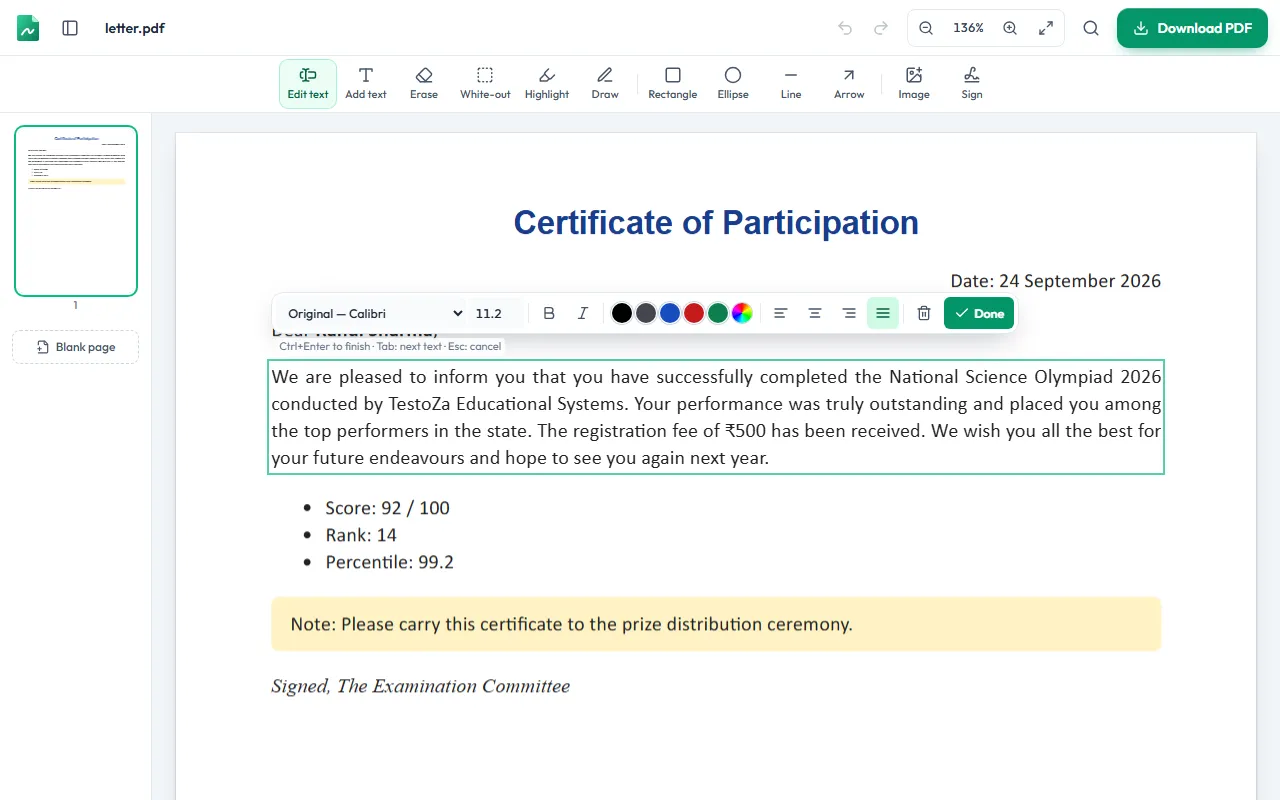
Click any line and change it. Your words are written in the PDF’s own font, in the same place. Use Add text, Erase, Highlight, Sign or Image from the toolbar for everything else.
Download the edited PDF
Press Download (or Ctrl+S). You get the file straight away — no watermark, no account, no waiting.
Everything you can do in the PDF editor
Edit existing text
Change names, dates, marks or whole paragraphs. Paragraphs re-flow inside their width and justified text stays justified.
Add new text
Place a text box anywhere, in the document’s fonts or in Helvetica, Times, Courier or Noto (including Hindi).
Erase for real
Drag over text to delete it from the file. The words are removed, not hidden under a white box.
White-out
Cover part of a scanned page or an image with the page colour, then type on top.
Highlight, draw and shapes
Highlight lines of text, draw freehand, and add rectangles, circles, lines and arrows.
Images and signatures
Insert a logo or photo, or sign by drawing, typing or uploading a signature.
Find and replace
Change a name, date or roll number everywhere in the document at once — formatting is kept.
Organise pages
Reorder, rotate, duplicate and delete pages, or insert a blank page.
Password-protected PDFs
Enter the password to open a locked PDF. The downloaded copy opens without it.
Why edits made with Panna don’t look edited
Most online PDF editors can’t write with the fonts embedded in your PDF. So they paint a white box over the old words and type new ones in Arial or Helvetica. The result is easy to spot — and the original text is still in the file underneath the box.
Panna edits the page itself. It reads how each line was written, writes your new words with the same embedded font, at the same size, colour and spacing, and removes the old words from the file. Paragraphs re-flow from the first changed line, so the rest of the page stays exactly as it was.
PDFs often contain only the letters they already use. If you type a letter that isn’t in the font — say a capital “V” in a document that never had one — Panna tells you before you finish and draws just that letter in the closest matching font.
Panna vs typical online PDF editors
What happens to your document, feature by feature.
| Feature | Panna | Typical online editor |
|---|---|---|
| Edited text uses the PDF’s own font | Retyped in Arial or Helvetica | |
| Erased text is deleted from the file | Covered with a white box | |
| Table cells edit independently | Often one box per column | |
| Hindi (Devanagari) text shaped correctly | Often broken matras | |
| Find and replace across pages | Rare | |
| Download without an account | Sign-up or paywall at download | |
| File stays on your device | Uploaded to a server | |
| Watermark on free downloads | None | Common |
Editing a Hindi document? हिंदी PDF
Panna shapes Devanagari properly — matras, conjuncts and reph — and keeps the text searchable. See what works with Unicode and old Kruti Dev files.
PDF editor questions
How can I edit a PDF for free?
- Open the PDF in Panna, click the text you want to change, type, and press Download. It is free, needs no account and adds no watermark. Everything happens in your browser, so the file is never uploaded.
Can I change the existing text in a PDF, not just add new text?
- Yes. Click any line or paragraph and edit it in place. Panna rewrites the text inside the PDF itself, so the result is real, searchable text — not a picture pasted on top.
Will the edited text match the original font?
- Panna writes your text with the font embedded in the PDF. PDFs often contain only the letters they already use; if you type a letter that is missing, Panna tells you which one and draws just that letter in the closest matching font.
How do I remove text from a PDF completely?
- Use the Erase tool and drag over the text. Panna deletes those words from the file, so they cannot be copied, searched or recovered from under a white box.
Can I edit a scanned PDF?
- A scanned page is a photo, so there is no text to change. Use White-out to cover the old words and Add text to type new ones. Automatic text recognition (OCR) is not available yet.
Is my PDF uploaded to a server?
- No. The file is opened and edited inside your browser on your own device. That is why Panna is safe for marksheets, certificates, ID proofs and other private documents.
Can I edit a PDF on my phone?
- Yes. Panna works in Chrome, Safari, Edge and Firefox on Android phones, iPhones, tablets and computers. Very large PDFs open faster on a laptop.
Can I open a password-protected PDF?
- Yes. If the PDF needs a password to open, enter it — it is used only in your browser. Please only edit documents you have the right to change.
What if I close the tab by mistake?
- Your changes are saved automatically in this browser. Open the editor again and choose “Continue editing” to pick up where you left off.
Last updated by the TestoZa team.
More free PDF tools
Processed on your device. Nothing is uploaded.